

Claude For Lawyers: Benefits, Limitations, & Best Practices
Claude for lawyers explained by OpenCase: real benefits, key limitations, and best practices to use AI safely in your legal practice.

Managing a law practice means juggling deadlines, client demands, and a constant flow of documents, all while making sure nothing slips through the cracks. Lawyers who want to move faster without sacrificing accuracy are turning to Claude as a practical tool for drafting, research, and day-to-day workflow management. The results speak for themselves: less time spent on routine tasks, and more time focused on the cases that matter.
The key is to use AI in a way that fits how lawyers actually work, not to adapt a general-purpose tool to legal tasks and hope for the best. OpenCase is built around that principle, offering purpose-built legal AI that helps firms use Claude safely, accurately, and with confidence.
Table of Contents
- What Is Claude and What Does It Offer?
- How Are Lawyers Using Claude in Their Daily Work?
- Can Claude Be Trusted for Legal Research and Citations?
- 7 Best Practices for Using Claude in Legal Work
- How OpenCase Complements Claude in a Legal Workflow
- Try our Legal AI to Support Your Legal Work from Research to Final Draft
Summary
- Claude's citation hallucination rate is approximately 12% for unverified legal research tasks, even though the model scored 83.1% on the LegalBench benchmark. That combination reveals a precise professional risk: strong legal reasoning capability does not guarantee source accuracy, and the two should not be treated as the same thing.
- The architectural reason citations fail is not a flaw that updates will fully resolve. Claude generates citations by predicting plausible language patterns, with no internal connection to a live database of reported decisions. A fabricated case name, a real-sounding reporter citation, and a plausible holding can all emerge from that process looking identical to verified law. The model cannot check itself against primary source records because that verification layer was never part of its core design.
- Courts are already responding to this gap. A public database tracking AI-related judicial decisions recorded 129 cases worldwide by mid-2025 where generative AI hallucinations appeared in submitted filings, with the monthly count still rising. The Concord Music Group matter involving Anthropic directly, where a citation to a non-existent article appeared in an expert declaration, illustrates how quickly a plausible-sounding output becomes a court-flagged error.
- Claude's 200,000-token context window, equivalent to roughly 500 pages of text, changes what is structurally possible in document-intensive legal work. Entire contract files, deposition transcripts, or multi-document discovery sets can be processed in a single session without losing coherence across the material. That capacity is what makes agent-style workflows practical rather than theoretical.
- Anthropic's own legal team demonstrated a concrete productivity outcome by cutting marketing review cycles from two to three days down to 24 hours through a Slack-integrated workflow that applies policy criteria before a lawyer ever sees the material. The hours recovered are not marginal. They are the hours that previously disappeared into mechanical reading and reappeared as late nights before filing deadlines.
- ABA Formal Opinion 512 is direct on the division of labor: generative tools cannot evaluate meaning or understand context the way a trained attorney can. Claude 3 Opus scored in the 90th percentile on the bar exam, demonstrating reasoning toward legal conclusions, but professional responsibility for those conclusions remains with the attorney regardless of how confident the output reads.
- Legal AI addresses this structural verification gap by anchoring research outputs to authenticated primary sources from Cornell LII, CourtListener, and govinfo, so every cited authority traces back to a confirmed record before it reaches a filing.
What Is Claude and What Does It Offer?
Claude is Anthropic's family of large language models built for serious professional work: writing, legal research support, document analysis, coding, and multi-step reasoning. It runs across web, mobile, and desktop with significant institutional backing. According to Coursera, Google and Amazon have combined to invest $4.4 billion in Anthropic, signaling a commitment to infrastructure-grade AI designed for sustained, high-stakes use.
"Google and Amazon have combined to invest $4.4 billion in Anthropic, signaling infrastructure-grade AI designed for sustained, high-stakes use." — Coursera
🎯 Key Point: Claude isn't a general-purpose chatbot — it's purpose-built for professional, high-stakes workflows where accuracy and reliability actually matter.
Claude supports a wide range of professional workflows through advanced reasoning and content processing:
- Writing – Handles long-form content creation, editing, and drafting tasks.
- Legal research support – Assists with document review and clause analysis.
- Document analysis – Performs summarization, information extraction, and document comparison.
- Coding – Supports debugging, code generation, and technical explanations.
- Multi-step reasoning – Helps with complex problem-solving, planning, and structured decision-making.
💡 Tip: With $4.4 billion in combined backing from two of the world's largest tech companies, Claude is positioned as an enterprise-ready tool — not an experiment.

What makes Claude different from other AI tools?
Claude's architecture centers on context and coherence. The Focused Data Scientist reports that Claude offers a 200,000-token context window, allowing you to load a full contract, long deposition transcript, or multi-document research file in a single session without losing continuity. For lawyers, this means working with a tool that maintains the whole picture rather than fragmenting your analysis.
How does Claude's model structure serve professional users?
Claude comes in different levels: Haiku for fast, high-volume tasks; Sonnet for everyday writing and thinking; Opus for difficult analysis, research, and multi-step legal workflows requiring precision. You can match each request to the model best suited for the job.
Why does citation verification matter when using Claude for lawyers?
Most lawyers start using Claude carefully, then constantly—the drafting speed alone changes how you organize your work across a caseload. But this speed poses a significant risk: general-purpose AI cannot verify citations against primary legal records. It reasons from patterns rather than confirmed sources. That gap matters when a brief bears your name. Legal AI platforms like OpenCase, built specifically for law and verified against sources such as Cornell LII, CourtListener, and govinfo, exist because this gap poses a professional liability.
What does Claude actually do well?
Claude's extended thinking mode works through complex problems step by step, checking its own reasoning before producing output. This makes it useful for analyzing contract language, synthesizing research across multiple documents, or stress-testing legal arguments. It also supports agentic workflows where it reads files, writes and revises drafts, and iterates without constant prompting, reducing friction in repetitive cognitive work.
Is Claude for lawyers a general tool or a purpose-built platform?
Claude is a serious professional tool built on serious infrastructure. However, a powerful general assistant and a purpose-built legal platform are not the same thing, and the difference becomes clear when the stakes are highest.
What happens when lawyers put Claude to work inside a real practice is where this becomes surprising.
Related Reading
- Law Practice Management
- Google Gemini For Lawyers
- Claude vs. ChatGPT for Lawyers
- ChatGPT Prompts For Lawyers
- Copilot For Lawyers
- Ai Use Cases For Lawyers
- Ai Legal Hallucinations
- Legal Tech Trends
- Prompt Engineering For Lawyers
- Legal Writing Ai
- Claude For Lawyers
- Ai Legal Ethics
How Are Lawyers Using Claude in Their Daily Work?
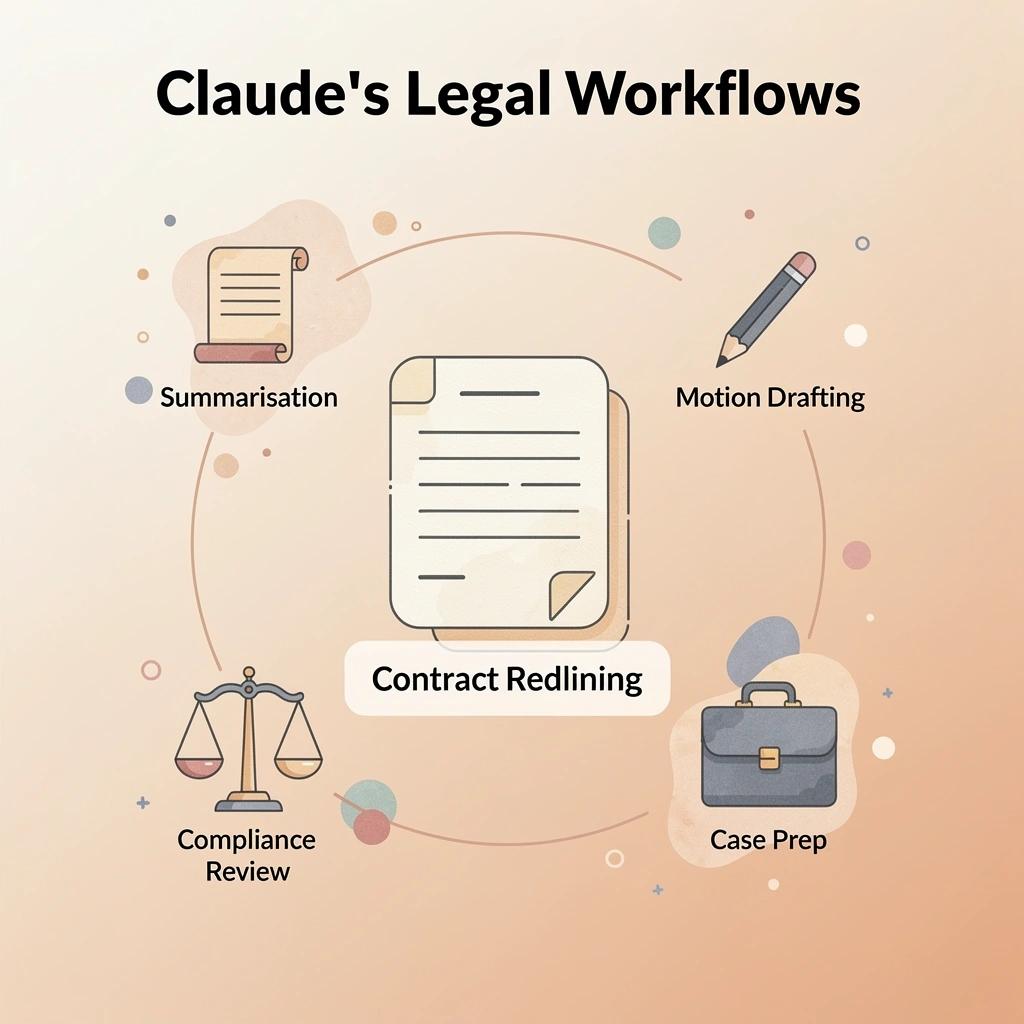
Lawyers are using Claude across six core workflows: contract redlining, document summarization, motion drafting, case preparation, compliance review, and custom agent workflows. The pattern is remarkably consistent — the tool handles mechanical tasks so attorneys can focus on judgment.
"The tool handles mechanical tasks so attorneys can focus on judgment — the one thing AI cannot replace."
Claude can support multiple legal workflows by accelerating analysis, drafting, and repetitive tasks:
- Contract redlining – Flags important clauses, suggests edits, and helps track document changes.
- Document summarization – Condenses lengthy filings into concise, actionable briefs.
- Motion drafting – Generates structured legal arguments to support the drafting process.
- Case preparation – Organizes facts, timelines, and key evidence for easier review.
- Compliance review – Screens documents against relevant regulatory requirements and standards.
- Custom agent workflows – Automates multi-step, repetitive legal processes to improve efficiency.
💡 Tip: If your firm hasn't mapped which of these six workflows consumes the most attorney hours, start there — that's your highest-value automation target.
🔑 Takeaway: The real productivity gain isn't any single feature — it's the cumulative time reclaimed across all six workflows, freeing lawyers to do what they do best: think critically and advise clients.
Where does the time actually go in legal work?
The failure point is usually the first pass. Whether it is a 60-page vendor agreement or a 400-page discovery set, the first read takes hours before legal thinking begins. Claude processes that initial pass, flags differences from standard playbooks, surfaces contradictions across witness statements, and organizes raw case files into structured chronologies. Anthropic's legal team demonstrated this concretely, cutting marketing review cycles from two to three days to 24 hours through a Slack-integrated workflow that applies policy criteria before a lawyer sees the material. The hours recovered are significant: they are the hours that previously disappeared into mechanical reading and reappeared as late nights before filing deadlines.
How does Claude for lawyers shift the burden of drafting?
The same pattern holds for drafting. Claude generates structured first drafts calibrated to the firm's voice and jurisdictional requirements when given templates or prior work product as references. Lawyers then edit substance rather than construct sentences from scratch, shifting the cognitive load from production to analysis.
What is the hidden cost of unverified legal research and citation work?
Most teams handle legal research and citation work by manually cross-referencing sources, pulling cases from multiple databases, and checking holdings one by one. The hidden cost emerges when a general-purpose assistant generates a citation that sounds authoritative but cannot be traced to a verified primary source record. OpenCase addresses this by grounding research outputs in Cornell LII, CourtListener, and govinfo, so every answer links to a real case, statute, or regulation rather than a plausible-sounding reconstruction.
What no-code agents actually change
Claude for Legal supplies named agents—Vendor Agreement Reviewer, DSAR Responder, Claim Chart Builder—that run full end-to-end tasks after a brief onboarding interview captures the firm's playbook. According to the Maryland State Bar Association's 2024 analysis of Claude, Claude supports a context window of up to 200,000 tokens, roughly equal to 500 pages of text. This capacity allows agents to hold an entire matter folder in working memory without losing context across documents. The firm's institutional knowledge is encoded once and applied consistently across similar matters, reducing reliance on individual attorneys' memory.
Where does Claude for lawyers perform best and where does caution apply?
Claude works best as a first-pass tool and drafting helper, reducing routine work without improving results. Exercise caution in workflows where cited authority needs to be verified against primary law records, since a general-purpose model lacks built-in verification layers.
But here is what most lawyers have not yet asked themselves: when research looks right and reads confidently, how would you know if it wasn't?
Can Claude Be Trusted for Legal Research and Citations?
Claude earns conditional trust for legal research, not unconditional confidence. The distinction matters more than most lawyers currently acknowledge.
"AI legal models hallucinate in 1 out of 6 or more benchmarking queries — a rate that demands mandatory human verification before any citation reaches a filing." — Stanford HAI
⚠️ Warning: Treating Claude as a fully reliable legal source without verification is one of the most costly mistakes a legal professional can make.

The leftover error rate is real and documented. According to the GC AI Blog's 2026 analysis of Claude for legal use, citation hallucination occurs in approximately 12% of unverified legal research tasks, even with an 83.1% LegalBench score. Claude is genuinely capable at legal reasoning, yet unreliable enough on citations that every reference needs human verification before it touches a filing.
Performance metrics provide useful benchmarks, but legal AI still requires human oversight:
- LegalBench score – Claude has achieved an 83.1% score, demonstrating strong performance across a range of legal reasoning tasks.
- Citation hallucination rate – Unverified outputs may still include citation errors, with an estimated hallucination rate of around 12%.
- Safe usage requirement – All AI-generated legal work should undergo 100% human verification before being relied upon in client matters or court filings.
🔑 Takeaway: An 83.1% accuracy score sounds impressive — until you realize a 12% hallucination rate on citations means roughly 1 in 8 unverified references could be fabricated or wrong, a risk no court filing can absorb.
💡 Tip: Use Claude for legal reasoning and issue-spotting, but treat every citation it produces as unverified until you have confirmed it against a primary legal source.
Why the verification gap is a structural problem, not a bug
The failure point is architectural, not accidental. Claude generates citations by predicting the next most plausible token based on training patterns. Legal language is formulaic enough that fabricated case names, real-sounding reporter citations, and plausible holdings emerge indistinguishable from verified law. The model lacks an internal pointer to a live, authoritative database of reported decisions and cannot verify itself against primary source records.
Most lawyers verify citations afterward via Westlaw or Lexis, like a spell-check pass. The risk surfaces when that check gets skipped under deadline pressure or when a citation looks familiar enough to pass without scrutiny—where hallucination rates translate into sanctions exposure. Purpose-built legal AI platforms like OpenCase address this structurally, anchoring every answer to verified primary sources from Cornell LII, CourtListener, and govinfo before generating the response.
The accountability question courts are already asking
Courts are not waiting for the profession to self-regulate. A public database tracking AI-related judicial decisions recorded 129 cases worldwide by mid-2025 where generative AI hallucinations appeared in submitted filings, with the monthly count still rising. The Concord Music Group matter involving Anthropic is instructive: a citation to a non-existent article appeared in an expert declaration prepared with Claude's assistance, which the court flagged as a serious concern. Competence under Model Rule 1.1 now requires understanding how to use these tools and where their architecture creates exposure.
Is your workflow designed to catch errors before they reach a judge?
The question is not whether Claude is trustworthy in general, but whether your current workflow is designed to catch the 12% before it reaches a judge.
The next challenge is figuring out how to set up that verification workflow in practice.
Related Reading
- Objections In Court
- Billable Meaning
- Is ChatGPT Good For Personal Injury Lawyers
- Lawyer Salary
- Will Lawyers Be Replaced By Ai
- How To Use ChatGPT For Legal Research
- Law Firm Marketing
- Legal Ai Tools
- Law Clerk
- Legal Billing Software
- Law Firm Seo
- Iolta Account
7 Best Practices for Using Claude in Legal Work
Claude works best as part of a careful legal workflow, not as the final decision-maker. Using consistent practices helps lawyers work significantly faster while keeping accuracy, confidentiality, and professional standards safe.
"AI works best as a collaborative tool within a structured legal workflow — never as a replacement for professional judgment and attorney oversight." — Legal AI Best Practices
🎯 Key Point: Claude is a powerful legal assistant, but human oversight remains essential — every output should be reviewed by a qualified attorney before use.
Following AI best practices helps legal teams improve efficiency while maintaining professional standards:
- Treat Claude as a drafting aid – Keeps legal judgment and final decision-making with the attorney.
- Review all AI-generated output – Ensures accuracy and maintains professional quality standards.
- Protect client confidentiality – Safeguards sensitive information and supports ethical obligations.
- Use consistent prompting – Produces more reliable and repeatable AI-generated results.
- Verify citations and case law – Reduces the risk of critical errors in legal filings.
- Define scope clearly – Helps prevent off-target responses and unnecessary scope creep.
- Document AI usage – Promotes transparency, accountability, and compliance with firm policies.
⚠️ Warning: Never submit AI-generated legal content without thorough attorney review — errors in legal documents can have serious professional and client consequences.
1. Treat Claude Strictly as a First-Pass Assistant
Claude speeds up the creation of outlines, first drafts, issue lists, and candidate authorities. Every generated sentence, suggested case, and proposed clause requires independent attorney review against primary sources before inclusion in client documents, court filings, or advice. ABA Formal Opinion 512 confirms that generative tools cannot understand context or evaluate meaning; the lawyer alone bears the duty of competence and candor. Firms that maintain this separation preserve productivity gains while eliminating the risk of unverified output reaching a tribunal or client.
2. Protect Confidentiality Through Plan Selection and Data Controls
Consumer versions of Claude have different data-handling terms than enterprise or team plans. Lawyers should upload only anonymized or non-privileged material into free or standard accounts, reserving full client files, medical records, or strategy notes for enterprise environments that exclude user data from model training. Anthropic's enterprise offerings encrypt data in transit and at rest. Matching the tool's privacy protection to the matter's sensitivity satisfies Model Rule 1.6 and prevents accidental loss of privilege.
3. Build Precise Prompts and Firm-Specific Playbooks
Generic requests produce generic results. Effective legal AI use starts with detailed instructions that define jurisdiction, desired output format, risk ranking criteria, and house style. Teams convert repeated workflows—NDA review, vendor agreement redlining, deposition summaries—into reusable skills or project instructions so Claude applies consistent standards across matters. This preparation reduces last-minute editing and embeds institutional knowledge into the interaction.
4. Select the Model Capability That Matches the Task
Claude offers multiple models that trade speed for depth. Complex research, multi-document diligence, and high-stakes analysis require the most capable models available under your plan, while routine summarization or high-volume clause extraction can use faster, lower-cost variants. Matching model strength to required accuracy controls cost and reliability.
5. Require Human Oversight at Every Decision Gate
Claude identifies problems, suggests language, and organizes information. The lawyer determines what matters, plans strategy, and approves final wording. Add clear review checkpoints after each piece of Claude's work: before sharing changes, before summaries inform strategy, and before citations enter legal filings. This approach converts remaining model limitations into manageable quality checks rather than professional risks.
6. Organize Work Inside Projects and Persistent Context
Claude's project and memory features keep related documents, earlier instructions, and subject-specific preferences together. Lawyers load governing agreements, earlier correspondence, and playbooks into a dedicated project so later prompts inherit accurate context. Projects support Artifacts that display live drafts or comparison tables, transforming conversations into editable workspaces tied to the matter rather than scattered separate chats.
7. Ground research output in verified primary sources
Claude can quickly create potential authorities and analysis, but every citation must be checked against official reporters or authenticated databases. Pair Claude's fast drafting with OpenCase, a professional AI solution trained on Cornell LII's authoritative datasets of U.S. statutes and Supreme Court opinions.
How does OpenCase keep Claude for lawyers grounded in verified law?
OpenCase uses daily indexes of federal and state opinions, RECAP dockets, and authenticated PDFs from GovInfo's Federal Register, CFR, and Public Law Archive. Answers remain traceable to verified primary law through its Sources Portal, providing attorneys a direct path from Claude's suggestions to confirmable authority.
What does this mean for attorneys using Claude for lawyers in practice?
These practices transform Claude from an interesting experiment into a reliable legal tool. The attorney remains the final decision-maker while the model provides the speed needed to focus that authority on more important judgments.
How OpenCase Complements Claude in a Legal Workflow
Claude brings together arguments, organizes motions, and compares documents across a large context window. The gap it leaves is source integrity: when a draft cites a case, someone must confirm that it exists, that it says what the draft claims, and that it is valid in the relevant jurisdiction.
"The gap Claude leaves is source integrity — when a draft cites a case, someone must confirm it exists, says what the draft claims, and is valid in the relevant jurisdiction."
Claude and OpenCase complement each other by combining drafting efficiency with legal verification:
- Synthesising arguments across documents – Claude excels at analysing and combining information, while OpenCase verifies that cited cases actually exist.
- Organising and drafting motions – Claude produces well-structured drafts, while OpenCase confirms that case holdings accurately support the legal arguments.
- Comparing documents with a large context window – Claude can analyse extensive document sets, while OpenCase validates jurisdictional relevance and legal authority.
🎯 Key Point: Claude is a powerful drafting engine — but source integrity is the critical gap that requires a dedicated verification layer like OpenCase.
💡 Tip: Never let an AI-drafted motion go to filing without independently verifying every cited case for existence, accuracy, and jurisdictional validity — this is exactly where OpenCase plugs into your workflow.
Where does Claude for lawyers hit a verification bottleneck?
That verification step is where most AI-assisted legal workflows break down. The familiar approach—running a Claude draft through Westlaw or Lexis and manually cross-checking citations—works for small volumes. As workload increases and deadlines tighten, this manual checkpoint becomes a bottleneck, and time pressure tempts you to trust the draft.
How does OpenCase anchor Claude's output in verified primary authority?
OpenCase solves this problem by using verified primary sources from the start. It draws authenticated laws and Supreme Court information from Cornell LII, daily-updated federal and state court decisions from CourtListener and RECAP, and verified federal rules from govinfo. Every answer links to a source that can be checked through its Sources Portal, allowing lawyers to move directly from Claude's suggestions to verifiable records. According to LawNext's Bob Ambrogi, Anthropic has released more than 20 MCP connectors and 12 practice-area plugins for Claude in the legal sector, demonstrating rapid growth in AI and specialized legal tool integration.
How does the combined workflow actually run?
Research starts in OpenCase to find the controlling authority and relevant docket filings. That foundation moves into Claude for synthesis, argument development, and first-draft generation. The draft returns to OpenCase's Sources Portal for citation confirmation before language goes into a client memo or court filing. Final editing happens in Word or Docs, where OpenCase's integrations with Microsoft 365, Google Workspace, and Clio keep attorneys within their existing tools.
How does this workflow support confidentiality obligations?
Security governance supports professional obligations. OpenCase maintains SOC 2 Type II compliance, ISO/IEC 27001 certification, and AI governance practices aligned with ISO 42001. Claude's enterprise configurations exclude customer data from model training. Using both platforms under their respective enterprise settings protects sensitive matter information across the full research-to-draft cycle, directly supporting confidentiality obligations.
Why does Claude for lawyers need verified sources to be defensible?
The key difference between this workflow and using only Claude is that you can defend your work. A draft built on checked primary sources and confirmed through a legal research platform gives the reviewing attorney something to stand behind when a partner or judge asks where the authority came from.
Try our Legal AI to Support your Legal Work from Research to Final Draft
OpenCase closes the gap between research and drafting by connecting every answer to verified primary sources, so both layers work as one unified system rather than two separate steps connected by manual checking.
"OpenCase closes the gap between research and drafting by connecting every answer to verified primary sources: so both layers work as one system rather than two separate steps connected by manual checking." — OpenCase
🔑 Takeaway: Manual verification between research and drafting is one of the biggest hidden time costs in legal work. OpenCase eliminates it by keeping sources and analysis connected from the start.
💡 Tip: Whether you're handling case law, statutes, or regulations, having every answer traceable to its original source means fewer errors and faster turnaround on every matter.

Run your next research question through OpenCase and watch verified case law, statutes, and regulations appear directly beside the analysis — all traceable through the Sources Portal to their original records. Start free or begin a 3-day Pro trial at opencase.com.
🎯 Key Point: From your first research question to your final draft, OpenCase keeps your entire workflow verified, connected, and audit-ready with zero manual gap-bridging required.
Related Reading
- ChatGPT for Lawyers
- Best Ai Contract Review Tool
- Ivo
- Harvey
- Clio
- Law Insider
- Legora
- Everlaw
- Spellbook