

9 Best Clio Alternatives for Legal Research in 2026
Clio not the right fit? OpenCase breaks down 9 proven alternatives for legal research to help you find the best tool in 2026.

Clio is a widely used law practice management platform that helps attorneys manage cases, track time, and communicate with clients. For legal research, though, some lawyers find it slower or more costly than they need. That gap has pushed many firms to seek dedicated research tools that fit their workflows without adding unnecessary complexity.
Speed and affordability matter when building a sustainable research process, and the right tool can make a measurable difference in how efficiently a firm operates. For attorneys ready to spend less time searching and more time practicing, OpenCase offers a compelling solution through its legal AI.
Table of Contents
- What Is Clio and What Does It Offer?
- Why Do Lawyers Look for Clio Alternatives?
- Is an AI Legal Research Platform Worth the Investment?
- 9 Best Clio Alternatives for Legal Research in 2026
- How to Choose the Right Legal Research AI Platform for Your Firm
- Why More Legal Professionals Are Choosing OpenCase
- Try our Legal AI to Support your Legal Work from Research to Final Draft
Summary
- Legal AI adoption across the profession is accelerating faster than most firm leaders anticipated. According to Clio's 2025 Legal Trends Report, 93% of mid-sized firms now report using AI in some form, and 74% of lawyers at growing firms have integrated AI into their practice. The question has shifted from whether to adopt legal technology to which tools actually connect meaningfully.
- Unrecorded time is one of the most significant sources of revenue loss in legal practice. At $400,000 in annual billings, a 10 to 15 percent time-capture failure translates to $40,000 to $60,000 in unbilled work before a single invoice goes out. This is a systems design problem, not a discipline problem, and platforms that automatically surface billable activity from existing workflows address it structurally rather than by changing attorney behavior.
- The financial case for legal AI research tools is stronger than most firms expect at the outset. A Forrester Total Economic Impact study found that a composite 500-attorney firm achieved 400% ROI over three years, with payback in under six months, driven primarily by a 25% increase in matter capacity without adding headcount. Senior associates and partners using AI research tools saved an average of 2.5 hours per week, with junior lawyers cutting previously written-off billable hours by up to 35%.
- Research workflows that run in parallel with case management systems create accountability gaps that pose professional risk. When attorneys pull case law from one platform and manually transfer citations into a matter record, each handoff introduces the possibility of unverified citations reaching a filing without a second check. A Forbes-reported study involving 127 law students found that AI tools improved work quality by 10 to 28% across multiple tasks while boosting productivity by 34 to 140%, largely because better first drafts reduce write-downs and tighten deadline management.
- The legal AI software market reflects where competitive pressure, client expectations, and talent retention are all converging at once. MarketsandMarkets projects market growth from USD 3.11 billion in 2025 to USD 10.82 billion by 2030. Separately, Deloitte's 2026 survey found that 79% of senior legal leaders are already increasing AI budgets by an average of 67%, with departments expecting AI to automate or save 28% of legal work within two to three years. Firms that treat AI research as optional are not holding their position; they are conceding capacity to competitors who are already absorbing more matters at the same headcount.
- Trust architecture, not feature breadth, is what determines whether a cautious, ethically obligated profession actually adopts a tool for active client matters. More than 60% of legal professionals reported using generative AI tools in their work according to DISCO's 2025 generative AI poll, but adoption of tools that touch confidential work product depends on verified sourcing, compliance certifications, and a clear policy against using uploaded files to train models. Law firm overhead costs can also be reduced by up to 40% when cloud-based tools integrate rather than run in parallel, according to Remote Attorneys, which means a platform's integration architecture carries direct financial weight.
- Legal AI addresses this by grounding research answers in primary sources such as Cornell LII, CourtListener, and govinfo, then syncing those verified findings directly into the case management environment where billing, documents, and professional judgment already reside.
What Is Clio and What Does It Offer?
Clio is a cloud-based legal practice management platform that brings together matters, billing, documents, calendars, client communications, and time tracking in one easy-to-access location.
💡 What Is Clio? Clio is more than just software — it's an all-in-one hub designed to eliminate the chaos of managing a law firm across disconnected tools.
Legal practice management software centralizes essential firm operations:
- Matters – Manages case files and related activities.
- Billing – Handles invoices, payments, and time entries.
- Documents – Organizes storage, drafting, and version history.
- Calendars – Tracks deadlines, hearings, and appointments.
- Client communications – Manages emails, messages, and client portals.
- Time tracking – Records billable hours and activity logs.

The platform organizes work around client matters: opening a case file instantly surfaces outstanding tasks, recent communications, trust balances, upcoming deadlines, and document history — all without switching between applications. This combined visibility is essential for firms that want to work with confidence rather than constantly catching up.
"The platform organizes work around client matters, giving firms a single view of tasks, communications, deadlines, and documents — eliminating the need to jump between disconnected tools." — Clio Platform Overview
⚠️ Common Mistake: Many firms underestimate how much time is lost switching between applications. Without a centralized platform like Clio, critical details — from trust balances to upcoming deadlines — can fall through the cracks.
🔑 Takeaway: Clio's matter-centric design means every piece of information your firm needs is connected, organized, and immediately accessible from a single case file view.
How does Clio use AI to reduce manual work for attorneys?
Clio's Manage AI features summarize matters, draft billing narratives, extract deadlines from documents, and generate client updates without requiring attorneys to leave the platform or re-enter data.
Most firms handle legal research with separate tools and then manually transfer findings into matter files, creating gaps where context is lost. Legal AI built for verified citations changes this. When research answers trace to primary sources like Cornell LII, CourtListener, and govinfo and sync directly into the Clio matter, research becomes part of the case file, visible to the team, and accountable to the work.
How does Clio handle billing, payments, and trust accounting?
Clio's billing system directly affects law firm revenue. The platform generates invoices from time entries, supports flat fees, hourly arrangements, and payment plans, and enables clients to pay by credit card, ACH, or digital wallet through a secure portal. Trust accounting maintains compliance with clear separation between operating and client funds.
What integrations and compliance standards does Clio support?
The platform connects to over 300 integrations including QuickBooks, Xero, DocuSign, Westlaw, and Zoom, and holds SOC 2 Type 2 certification, PCI compliance, and bar association approval across all 50 U.S. states.
Even a platform this complete does not work the same way for every firm.
Related Reading
- Law Practice Management
- Google Gemini For Lawyers
- Claude vs. ChatGPT for Lawyers
- ChatGPT Prompts For Lawyers
- Copilot For Lawyers
- Ai Use Cases For Lawyers
- Ai Legal Hallucinations
- Legal Tech Trends
- Prompt Engineering For Lawyers
- Legal Writing Ai
- Claude For Lawyers
- Ai Legal Ethics
Why Do Lawyers Look for Clio Alternatives?
Lawyers leave Clio when their firm gets too big for it. As the number of employees grows, billing becomes more complicated, and the cost per user goes up. This makes the gap between what Clio says it can do and what it actually does get wider — making the software feel like a penalty for growing rather than a way to help the business.
"As law firms scale, the gap between promised functionality and real-world performance becomes a critical breaking point — turning a once-useful tool into a growth bottleneck." — Legal Tech Industry Insight
💡 Tip: If your firm is adding headcount and your software costs are climbing faster than your revenue, it's a strong signal you've outgrown your current platform.
⚠️ Warning: A rising cost-per-user combined with unmet feature expectations is one of the most common — and most expensive — reasons firms delay switching tools. Don't wait until it becomes a financial drain.
Growth challenges can expose limitations in legal software platforms:
- Rising cost per user – Makes software less affordable as your firm grows.
- Billing complexity – Increases as more employees make invoicing harder to manage.
- Feature gaps – Create problems when promised capabilities fail under real-world demands.
- Growth penalty feeling – Turns expansion into a burden instead of enabling firm growth.
🔑 Takeaway: The real problem isn't just price — it's that Clio's value proposition weakens at scale, leaving growing firms searching for an alternative that grows with them.

When Pricing Outpaces Value
Per-user pricing feels reasonable at two attorneys. At ten, it becomes a recurring budget conversation. A firm running Clio's mid-to-high tier across ten timekeepers and support staff can cross $17,000 annually before add-ons, Clio Grow, payments processing fees, or the parallel QuickBooks subscription needed for general ledger functions Clio doesn't natively replace. The math breaks when partners realize they're funding a feature set used at roughly 30 percent capacity. Flat-rate or capability-based pricing would redirect that capital toward hiring, marketing, or profit—where growth-stage firms need it most.
Why does time capture fail before billing even begins?
The problem usually is not how hard people work; it is capturing the time. Time that is not written down does not get billed, and time entered from memory at the end of the day is already losing accuracy. On $400,000 in annual billings, a 10 to 15 percent capture failure means $40,000 to $60,000 disappears before invoicing. This is not a billing problem; it is a systems problem.
How does Clio close the gap structurally rather than through willpower?
Most companies handle this by training lawyers to record their time more carefully, which works until the next busy week. The common approach treats time capture as a discipline problem when it is a design problem. Platforms that automatically show billable activity from email threads, calendar events, and document edits close that gap structurally, not through willpower.
Research Lives in One Place, Matters Live in Another
The same friction shows up in legal research workflows. Attorneys pull case law from one platform, draft arguments in another, and manually transfer citations into the matter record inside Clio. Each handoff risks accuracy slips—unverified citations can reach filings without a second check. Legal AI that syncs directly with Clio matter records transforms that accountability chain. When research answers are traceable to primary sources such as Cornell LII, CourtListener, and govinfo, and those answers reside in the same matter file where billing and documents are managed, verification is built into the workflow rather than added afterward. This is not a convenience upgrade; it is a professional responsibility upgrade.
Workflow Rigidity in a Specialization-Driven Market
Clio was built for a broad market, fitting average firms well but not specialized firms. Immigration practices, high-volume personal injury shops, and estate planning boutiques encounter matter structures and billing assumptions requiring workarounds. Workarounds become habits, habits become technical debt, and technical debt slows onboarding for new associates. Purpose-built alternatives or layered tools matching a specialty practice's exact workflow eliminate that drag and let software serve the work rather than the reverse.
But the deeper question of whether switching platforms makes a difference is more surprising than most firms expect.
Is an AI Legal Research Platform Worth the Investment?
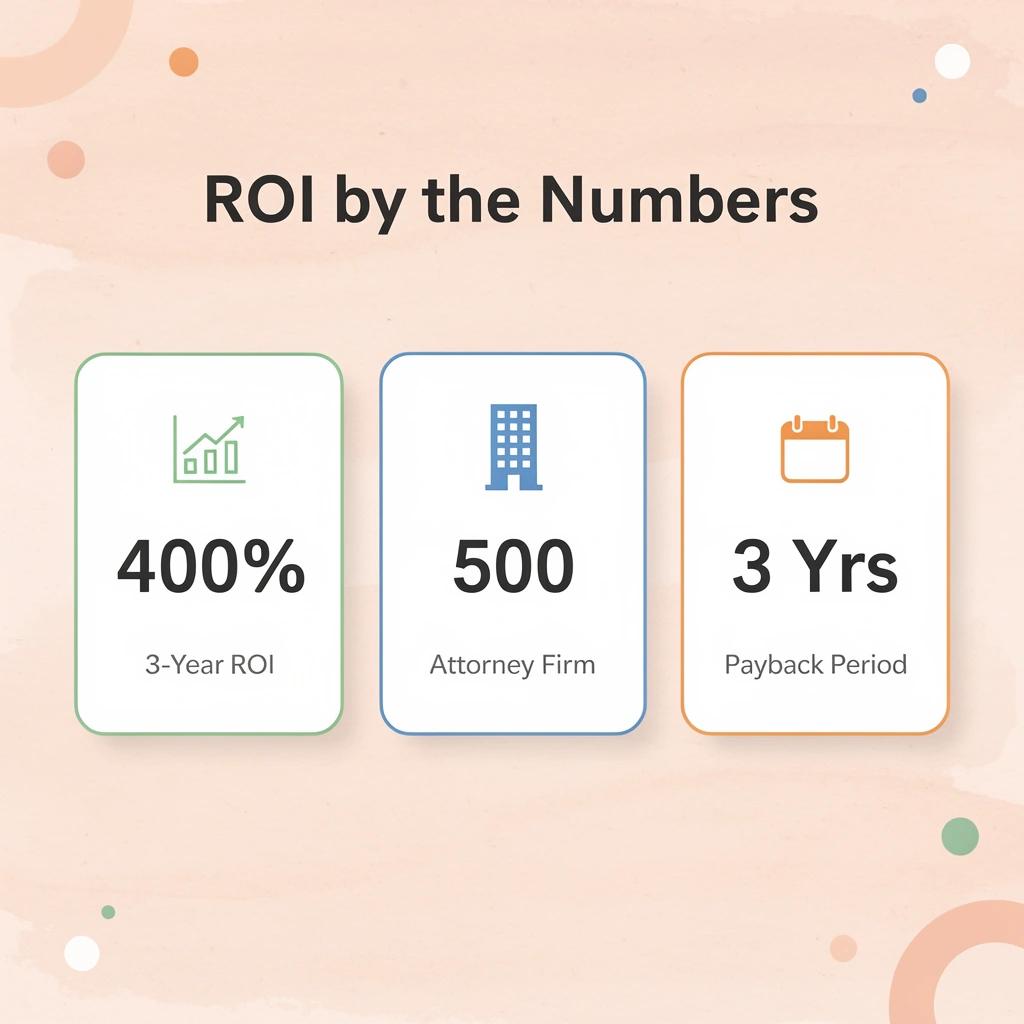
An AI legal research platform pays for itself faster than most firm leaders expect. Forrester's independent Total Economic Impact study of CoCounsel Legal found a composite 500-attorney firm achieved a 400% ROI over three years, with payback in under six months. The biggest driver was a 25% increase in matter capacity without adding lawyers, generating $20.3 million in extra revenue.
"A composite 500-attorney firm achieved 400% ROI over three years, with full payback in under six months — driven by a 25% increase in matter capacity and $20.3 million in additional revenue." — Forrester Total Economic Impact Study, CoCounsel Legal
🔑 Takeaway: A 25% capacity increase without headcount growth lets firms scale revenue without scaling costs, making the ROI case for AI legal research self-funding.
💡 Tip: When evaluating an AI legal research platform, ask vendors for a Total Economic Impact (TEI) study or ROI calculator benchmarked to your firm size. The payback period may be shorter than your budget cycle.
How does Clio help capture the hours that actually move the needle?
Senior associates and partners at firms using Lexis+ AI saved 2.5 hours per week on research and drafting, according to a Forrester TEI study showing a 344% return on investment for large law firms over three years. Junior lawyers recovered up to 35% of previously lost billable hours. These gains translate to higher realization rates, more cases per attorney, and reduced revenue loss from unrecorded time.
Why is the legal AI market growing too fast to ignore?
According to MarketsandMarkets, the legal AI software market is expected to grow from USD 3.11 billion in 2025 to USD 10.82 billion by 2030. Firms that treat AI research as optional cede an advantage to competitors that handle more cases with the same workforce.
Why does verified AI research change the equation for attorneys?
Lawyers worry about using AI research tools because of hallucination risk—a genuine concern with general-purpose tools, but one that disappears when the platform grounds every answer in primary sources. A Forbes-reported study of 127 law students found that AI tools improved work quality by 10 to 28% across multiple tasks while boosting productivity by 34 to 140%. Better first drafts mean fewer rewrites, tighter deadlines, and associates focusing mental energy on judgment rather than mechanical information gathering.
How does integrating research with Clio keep the trust chain intact?
The familiar workflow of running research in a standalone tool, then manually transferring findings into a practice management system like Clio, creates a gap where context gets lost, and accountability becomes unclear. Platforms like OpenCase close that gap by syncing legal matters and case documents directly with verified research grounded in primary sources including Cornell LII, CourtListener, and govinfo. When cited answers reside within the same matter record where professional judgment is exercised, the trust chain from research to client outcome remains intact.
What delay actually costs
Deloitte's 2026 survey of senior legal leaders found that departments expect AI to automate or save an average of 28% of legal work within two to three years, and that 79% have already increased AI budgets by an average of 67%. Every quarter a firm waits, a competitor absorbs that capacity gain instead. The subscription cost becomes a fraction of the new revenue the platform creates. Waiting is not neutral; it compounds in the wrong direction.
Does Clio execution matter more than features?
The fastest-growing firms choose one platform over another based less on features than on how well it performs.
Related Reading
- Legal Ai Tools
- Law Clerk
- Billable Meaning
- Legal Billing Software
- Law Firm Seo
- Lawyer Salary
- Will Lawyers Be Replaced By Ai
- Objections In Court
- Iolta Account
- Is ChatGPT Good For Personal Injury Lawyers
- Law Firm Marketing
- How To Use ChatGPT For Legal Research
9 Best Clio Alternatives for Legal Research in 2026
Clio is primarily practice management software for cases, billing, documents, and client relationships—not a complete legal research database. The alternatives below focus on legal research, document drafting, citation verification, and substantive legal work, addressing the critical workflow gaps discussed earlier.
"Clio is practice management software for cases, billing, and client relationships—not a complete legal research database." — Section Overview, 2026
🔑 Takeaway: If your firm relies on Clio alone, you are missing essential legal research capabilities—the tools below are built to fill exactly that gap.
💡 Tip: When evaluating Clio alternatives, prioritize platforms that cover citation verification, document drafting, and substantive legal research—the three core workflow gaps Clio leaves unaddressed.
Clio and legal research platforms serve different purposes:
- Case management – Clio provides this capability, while legal research alternatives vary.
- Legal research database – Legal research platforms offer dedicated databases, while Clio does not.
- Document drafting – Alternatives provide stronger drafting capabilities, while Clio offers limited support.
- Citation verification – Legal research tools provide verification, which Clio does not.
- Substantive legal work – Legal research platforms support deeper legal tasks beyond Clio’s core focus.

1. OpenCase
OpenCase is an AI legal research platform that delivers answers grounded in verified primary law from Cornell LII's U.S. statutes and Supreme Court opinions, daily indexes of federal and state court opinions, RECAP dockets, and authenticated PDFs from govinfo's Federal Register, CFR, and public-law archive. It ingests daily PACER dockets and filings. By integrating research, drafting, case tracking, and Clio sync into a single system, OpenCase eliminates tool switching, manual research overhead, rising per-user costs, and incomplete time capture.
Key Features
- AI legal research grounded in verified primary law from Cornell LII, RECAP, and govinfo.
- Daily ingestion of PACER dockets, filings, and open-source federal and state court opinions.
- Authenticated PDF ingestion from govinfo's Federal Register, CFR, and public-law archives.
- Jurisdiction-specific research that keeps results relevant to applicable law.
- Context-aware document editing that rewrites, expands, or tightens sections using facts and arguments already in your document.
- Microsoft Word plugin for research, drafting, citation extraction, and argument validation without leaving Word.
- Direct Clio integration that syncs legal matters and case documents.
- Google Docs, Outlook, Google Drive, Dropbox, and SharePoint connections for seamless file access.
- File storage and analysis with deeper legal context — page limits scale by plan.
- Case monitoring tracks relevant developments weekly on Basic and daily on Pro and higher.
- Calendar integration, shared projects, shared file storage, and team management features on higher plans.
Pros
- Answers trace to verified primary law sources, reducing verification time and hallucination risk.
- Clio sync and Word/Outlook/Google integrations remove tool-switching friction and keep research within existing workflows.
- Free Basic tier plus transparent, low per-seat pricing ($82–$119 annually) prevents the per-user cost spiral seen on larger platforms.
- Unlimited research questions and higher page limits on paid plans recover billable hours lost to manual searching.
- Enterprise-grade security (SOC 2 Type II, ISO/IEC 27001, ISO 42001-aligned governance, encryption in transit and at rest, data never used for training) protects client matters.
- Daily PACER and docket ingestion plus case monitoring keep research current.
- Context-aware drafting and editing frees attorneys for higher-value judgment work and increases matter capacity.
Cons
- OpenCase is not a law firm, creates no attorney-client relationship or privilege, and supplies information solely for educational and research purposes.
Accessibility
- Basic (Free): up to 3 research questions per day, folders up to 10 pages, weekly case monitoring, Microsoft Word plugin, and calendar integration.
- Pro ($82 per seat/month billed annually, or $99 monthly): unlimited research questions, folders up to 100 pages, cloud integrations (Google, SharePoint), and daily case monitoring. 3-day free trial.
- Business ($119 per seat/month billed annually, or $150 monthly): everything in Pro, plus folders up to 300 pages, team management, shared projects, and shared file storage; 3-day free trial.
- Enterprise (custom pricing): everything in Business, plus single sign-on, dedicated account manager, API access, custom integrations, custom SLA and DPA.
2. CoCounsel (Thomson Reuters)
CoCounsel layers agentic AI on Westlaw and Practical Law content to handle multi-step legal research, document analysis, drafting, and contract review. It plans research workflows, pulls verified authorities with KeyCite flags, and produces structured memos, turning Clio’s assistive AI into a true capacity engine that boosts matter volume 25% without new headcount. Firms adopt it to reclaim the 2–5 hours per lawyer per week lost to manual research and to cut write-downs from incomplete time capture.
Key Features
- Deep Research agentic workflows that plan, search Westlaw, and synthesize multi-step reports
- KeyCite-integrated citation checking and flags
- Document analyzer for litigation files, depositions, and contracts
- Drafting tools with Practical Law templates and clause libraries
- Workspaces that carry matter context, precedents, and prior positions across sessions
- Brief Builder for motions and briefs grounded in Westlaw authority
- Integration with existing Westlaw subscriptions and Microsoft tools
Pros
Highest-trust grounding in Westlaw editorial content; proven 400% ROI and sub-6-month payback in Forrester TEI; agentic capabilities free attorneys for higher-value work; strong for litigation and mid-to-large firms.
Cons
Premium pricing usually requires Westlaw bundle; steeper for solos; verification still mandatory; learning curve for full agentic features.
Accessibility
Core around $225/user/month; full Legal tier higher when bundled with Westlaw (total often $300–600+/user/month). Quote-based; contact Thomson Reuters. Available as add-on or bundle; demos and trials via sales.
3. Lexis+ with Protégé
Lexis+ with Protégé (formerly Lexis+ AI) combines conversational research, agentic drafting, and Shepard’s citation validation inside the LexisNexis ecosystem. Protégé runs multi-step workflows, summarizes documents, drafts from precedent, and verifies authorities, delivering the 344% ROI Forrester documented for large firms by cutting research and drafting time while raising realization rates. It directly counters Clio’s feature bloat and limited native research depth with purpose-built legal AI.
Key Features
- Protégé AI assistant for conversational research grounded in Lexis primary and secondary sources
- Shepard’s citation validation and Trust Markers for AI-generated cites
- Agentic drafting agents for contracts, motions, briefs, and deal documents
- Document Vault supporting up to 100,000 files plus audio/video
- 300+ pre-built workflows and skills for research, review, and compliance
- Workrooms for secure collaboration with clients and co-counsel
- Deep Research and model routing (GPT, Claude, etc.) with Best Fit selection
Pros
Shepard’s integration for high-confidence citations; strong Forrester-proven ROI and under-6-month payback; excellent for in-house and firm workflows; extensive pre-built skills speed adoption.
Cons
Quote-based pricing with base Lexis+ required; can feel expensive for pure research needs; some advanced features gated.
Accessibility
Quote-based; AI add-on estimates $125–275/user/month on top of Lexis+ (total often $250–500+/user). Demos and trials via LexisNexis sales. Available in Lexis+ interface, Word, Outlook, and mobile.
4. Harvey AI
Harvey is an enterprise legal AI platform built on custom models and firm-uploaded data (via Vault) for research, drafting, due diligence, and custom agentic workflows. It handles bulk document analysis at scale and lets firms encode their own expertise into reusable agents, solving Clio’s rigidity for complex litigation and high-volume matters while delivering the speed and capacity gains large teams demand.
Key Features
- Custom Agent Builder for firm-specific multi-step legal workflows
- Vault for secure analysis of up to 10,000+ documents per project
- Research and drafting grounded in firm data plus optional primary-law integrations
- Due diligence and contract review at massive scale
- Model routing across frontier LLMs with legal fine-tuning
- Enterprise security (SOC 2, ethical walls, audit trails) and DMS integrations (iManage, NetDocuments)
- Pre-built and custom workflows for litigation, transactions, and compliance
Pros
Best-in-class for BigLaw scale and custom agents; extreme speed on document-heavy work; strong security and firm-data privacy; widely adopted by Am Law 100.
Cons
Enterprise-only with high minimums (often 20 seats, $288K+ annual entry); long sales and implementation cycles; overkill and inaccessible for small firms.
Accessibility
Custom enterprise pricing; reported $1,000–1,200+/lawyer/month with 12-month minimums. No self-serve; contact Harvey sales for demos. Requires procurement process.
5. vLex Vincent AI
Vincent AI (part of vLex, now under Clio ownership) powers natural-language research across a global database of 1B+ documents from 100+ countries, with strong U.S. coverage via Fastcase. It generates cited memos, 50-state surveys, jurisdiction comparisons, and litigation intelligence—giving Clio users a powerful research upgrade that stays within a familiar ecosystem while closing multi-jurisdiction gaps and speeding up manual synthesis.
Key Features
- Natural-language research with fully cited answers and primary-source links
- 50-state surveys and multi-jurisdiction comparison tools
- Litigation intelligence (judge, counsel, and party analytics from dockets)
- Contract review, redlining, and risk flagging
- Document and deposition analysis plus argument building
- Global coverage across 100+ countries plus deep U.S. primary law
- Integration path with Clio and Fastcase base
Pros
Exceptional global and multi-state reach; free Fastcase base via many bars lowers entry cost; strong productivity gains (independent benchmarks cite 38%+); Clio ownership eases integration.
Cons
Full Vincent AI is quote-based and premium; free bar version lacks advanced AI; some features are still maturing post-acquisition.
Accessibility
Fastcase base free via 40+ state bars; Vincent AI quote-based (third-party estimates ~$69–399/user/month depending on tier). Trials and demos via vLex/Clio. Self-serve options for base; sales for full AI.
6. Bloomberg Law
Bloomberg Law combines comprehensive primary law, dockets, news, and company intelligence with AI-powered Brief Analyzer, docket analytics, and research tools. It excels at transactional, regulatory, and litigation-support research that Clio’s lighter library cannot match, delivering faster brief analysis, judge and party insights, and business-context research that turns scattered data into actionable strategy while controlling costs through flat-fee pricing.
Key Features
- AI Brief Analyzer that evaluates arguments, citations, and opposing briefs
- Extensive docket coverage and litigation analytics (judge, counsel, outcomes)
- Primary law, statutes, regulations, and Practical Guidance-style content
- Company and market intelligence integrated with legal research
- BCite citation analysis and Shepard’s-style validation
- Transactional and regulatory workflow tools
- Flat-fee, all-inclusive access without per-search charges
Pros
Strong analytics and business intelligence edge; transparent flat pricing; excellent for corporate, transactional, and litigation support work; reduces reliance on multiple paid databases.
Cons
Less depth in pure editorial case headnotes than Westlaw/Lexis; AI features are solid but not the most agentic; quote-based for larger teams.
Accessibility
Quote-based; small teams (2–24 users) can often buy directly; volume discounts for larger firms. Demos and trials available via Bloomberg Law sales. Strong web and mobile access.
7. Fastcase (vLex Fastcase)
Fastcase (now part of the vLex/Clio family) provides free or low-cost access to U.S. primary law through most state bars, with paid upgrades unlocking deeper content and AI features. It serves as the most accessible Clio research alternative for solos and small firms, eliminating per-user research cost creep while providing solid case law, statutes, and basic AI tools that free attorneys from manual searching and incomplete time capture.
Key Features
- Free core library of federal and 50-state case law, statutes, and regulations via bar memberships
- Advanced search, filters, and authority maps
- Citation tools and negative treatment flags
- Docket and filing access in higher tiers
- Integration path with Vincent AI and Clio
- Mobile apps and offline access options
- Affordable premium upgrades for expanded content
Pros
Often completely free through bar associations; dramatically lower cost than Clio research add-ons or Westlaw/Lexis; clean interface; sufficient for most day-to-day U.S. research.
Cons
Free tier lacks advanced AI and global depth; premium AI requires an upgrade; editorial enhancements are thinner than those of legacy publishers.
Accessibility
Free via 40+ state bar associations; standalone premium around $65–95/user/month; Vincent AI add-on quote-based. Self-serve bar access; sales for firm plans. Easy web and app login.
8. Paxton AI
Paxton AI is a self-serve AI legal research and drafting assistant built for solos and small firms. It focuses on matter-organized research, citation-backed answers, document review, and drafting—delivering transparent pricing and fast onboarding that directly attacks Clio’s scaling costs, feature bloat, and weak automated research capture.
Key Features
- AI research with cited primary-law answers organized by matter
- Document review, summarization, and risk flagging
- Drafting assistance for memos, motions, and correspondence
- Matter memory that retains context across sessions
- Citation checking and source linking
- Self-serve interface with Word/email integrations
- Unlimited or high-volume query options on paid plans
Pros
Transparent, predictable pricing; no long sales cycle; strong for solos who need one tool for research + drafting; quick time-to-value; addresses lost billable research time.
Cons
Narrower database than Westlaw/Lexis/vLex; less suited to complex multi-jurisdiction or BigLaw-scale work; verification still required.
Accessibility
Individual plan approximately $499/user/month or $2,999/user/year; Enterprise custom. 7-day free trial.
9. Midpage
Midpage offers an affordable, AI-native case-law research platform with a built-in AI citator, natural-language search, and drafting support. It targets cost-conscious firms seeking a lightweight Clio research alternative that recovers billable hours through faster, verified case finding without the overhead of full practice-management suites or premium publisher lock-in.
Key Features
- AI-powered case-law search across federal and state appellate opinions
- Built-in AI citator with negative/caution/neutral signals
- Natural-language queries and 50-state coverage
- Drafting and memo generation tools
- Citation extraction and source linking
- Clean, fast interface optimized for research speed
- Student and professional pricing tiers
Pros
Published low pricing; strong AI citator for the price; excellent for pure case-law research; quick setup; helps close the 10–15% billable-time leakage from manual capture.
Cons
Focused mainly on case law (fewer statutes/regulations/secondary); smaller ecosystem than major platforms; newer player with evolving coverage.
Accessibility
Professional plan around $99/month; student tier lower. Free trial available
How to Choose the Right Legal Research AI Platform for Your Firm
Choosing a legal research AI platform means picking a solution that works seamlessly with your firm's existing workflow. The right platform cuts down on administrative work, improves research accuracy, and helps attorneys complete critical legal work faster — without sacrificing reliability.
"The right legal research AI platform doesn't just save time — it transforms how attorneys approach research accuracy, workflow efficiency, and case outcomes." — Legal Technology Insight
Evaluating legal AI requires focus on accuracy, efficiency, and trust:
- Workflow integration – Reduces friction with native connections to existing tools.
- Research accuracy – Ensures reliable, citation-ready results through verified legal sources.
- Speed and efficiency – Saves attorney time with fast responses and summarization.
- Reliability – Protects firm reputation with audit trails and transparent sourcing.
💡 Tip: Before committing to any platform, always run a pilot test with your most common research tasks to evaluate real-world performance — not just demo conditions.
⚠️ Warning: Don't choose a platform based on features alone. A tool that doesn't integrate with your firm's existing workflow will create more administrative burden, not less — undermining the very efficiency gains you're seeking.

Assess Your Firm’s Size, Practice Mix, and Existing Research Stack
Solo and small firms with fewer than 20 lawyers benefit most from self-serve options with clear pricing that add AI research to basic practice management without long-term contracts or high seat minimums. Mid-size firms already paying for Westlaw or Lexis should focus on the AI layer that works directly with those databases (CoCounsel on Westlaw or Protégé on Lexis) to avoid duplicate-content costs and use KeyCite or Shepard's validation.
Large and Am Law firms that need to analyze many documents and create custom agents should consider enterprise platforms like Harvey, which can handle thousands of documents per matter and firm-specific workflow encoding. Gartner notes that specialized legal AI platforms are speeding up research workflows, driving legal tech budgets to double by 2028. Choose a platform whose costs scale with your actual work rather than charging every user for the same expensive seat.
Demand Grounding in Verified Primary Law and Transparent Citation Architecture
Accuracy is non-negotiable. Insist on platforms that retrieve and cite directly from authoritative primary sources—Cornell LII, Westlaw, Lexis, RECAP, govinfo, or equivalent verified corpora—rather than generating answers from general training data. Independent benchmarks such as Stanford's evaluations and Legal Research Bench scores reveal material differences: some tools make mistakes on 17–34 percent of complex queries, while others have driven citation errors down to 3–5 percent through retrieval-augmented generation and citator integration. Require pinpoint citations, Bluebook formatting support, and easy verification pathways. Treat every AI output as a first draft requiring attorney review; platforms that enable fast, transparent verification deliver real-time savings.
Evaluate Security, Data Isolation, and Professional Responsibility Safeguards
Keeping client information private and adhering to ethical rules require strong security controls. Ensure the vendor has SOC 2 Type II compliance, ISO/IEC 27001 certification, encryption for data in transit and at rest, and a contract prohibiting use of your firm's data to train models. Seek vendors offering private data isolation, configurable data retention, US or GovCloud hosting only, and transparent data processing agreements. ABA ethics guidance and court decisions establish that lawyers remain responsible for AI outputs; select platforms supporting audit trails, disclosure logging, and human-in-the-loop workflows to demonstrate reasonable care. Tools that deprioritize security create a malpractice risk that exceeds any subscription cost.
Measure Real Workflow Fit, Integrations, and Time-to-Value
A platform only works if lawyers use it daily. Test whether it integrates with Microsoft Word, Outlook, Google Docs, and your practice management system (especially Clio). Strong integrations eliminate copy-paste friction and keep research within the matter file. Look for smart drafting, matter memory, folder analysis, daily case monitoring, and calendar extraction that convert research directly into billable work products. Run timed pilots on your actual research questions—memos, opposition analysis, multi-state surveys—and measure both speed and first-draft quality after human review.
Calculate Total Cost of Ownership Against Recovered Capacity and ROI
The sticker price is just the beginning. Consider minimum seat requirements, base research subscriptions, setup time, training costs, verification overhead, and yearly price increases. Self-serve platforms with free or low-entry tiers suit cost-conscious firms; enterprise tools with 20-seat minimums and six-figure annual commitments fit only high-volume practices. A platform costing $82–$225 per seat that frees up two billable hours weekly can pay for itself many times over within months. Request clear pricing, short trials, and transparent upgrade paths so you can validate the platform's value before committing.
Prioritize Agentic Capabilities and Continuous Content Freshness Without Losing Human Control
The strongest platforms go beyond single-prompt answers to multi-step research that plans queries, brings together authorities, and produces structured memos while requiring attorney oversight. Confirm daily or real-time updates to dockets, opinions, and regulations (via PACER, RECAP, and govinfo feeds). Balance research power with guardrails such as citation validation, source links, and easy editing, so the tool expands capacity rather than creating risk. Firms selecting this combination convert research time into higher-value client work and stay competitive as legal tech budgets expand.
Why More Legal Professionals Are Choosing OpenCase
Legal professionals choose platforms based on what works when things get tough. What makes growing firms want to use a tool is whether it can be trusted when it really matters—when a motion is due, a docket update changes the plan, or a client needs a verified answer within the hour.
"The true test of any legal platform isn't how it performs on an average day—it's whether it holds up when a motion is due, a docket shifts, or a client demands answers fast." — OpenCase
🎯 Key Point: Legal professionals don't choose tools based on features alone—they choose based on reliability under pressure, when every minute counts and failure is not an option.
💡 Tip: When evaluating a legal case management platform, test it against your hardest scenarios first—deadline crunches, last-minute docket changes, and urgent client requests—not just your everyday workflow.
OpenCase helps firms respond faster with verified legal intelligence:
- Motion due – Provides real-time document retrieval when firms need instant case file access.
- Docket update – Enables immediate strategy adjustments through live docket sync and alerts.
- Client urgent query – Delivers fast, verified responses backed by trusted sources.

How does source accountability compare to Clio and other platforms?
Attorneys who switch to legal AI are solving a specific accountability problem. Research output is only as useful as its source. When an answer connects to authenticated statutes and court opinions from Cornell LII, CourtListener, and govinfo, the attorney works with a verifiable chain of authority that can withstand scrutiny from clients, partners, or judges. This offers value beyond speed alone.
Why does context-switching cost attorneys more than they realize?
Most attorneys handle research by opening a separate tab, pulling a result, copying text, then switching back to their document or Clio matter to apply it. This creates invisible seams in the workflow: each window switch causes a loss of place and focus and separates research information from the case record, where professional judgment lives. According to Remote Attorneys, law firm overhead costs can be reduced by up to 40% when attorneys use cloud-based case management platforms, but only when tools work together rather than run separately.
How does research living inside a Clio matter change the workflow?
OpenCase closes that gap by syncing directly with Clio, so research, drafting, and matter management exist in the same workspace. The attorney doesn't move information between systems; the system moves with the attorney. This shift from tool-switching to tool-convergence accelerates adoption once a firm tests it on a real matter under real deadline pressure.
Why is AI adoption accelerating across the legal profession?
The profession is not slowly warming to AI. DISCO's 2025 generative AI poll found that more than 60% of legal professionals use generative AI tools in their work. The question is no longer whether to use AI but which tool earns the right to work with active client matters. Verified sourcing, SOC 2 Type II compliance, ISO 27001 certification, and a strict policy against using uploaded files to train models are not marketing checkboxes: they are the conditions under which an ethically obligated profession decides to trust a tool with confidential work product.
Why does the Clio integration make trust architecture matter?
Firms choose OpenCase because the trust architecture aligns with professional stakes, and the Clio integration delivers verified legal intelligence directly where case decisions are made, not one browser tab away.
Once you see how that trust architecture works from the first research question through to a finished, citation-verified draft, the gap between what most attorneys accept and what is possible becomes impossible to unsee.
Related Reading
- Harvey
- Spellbook
- Best Ai Contract Review Tool
- Ivo
- Law Insider
- Everlaw
- Legora
- ChatGPT for Lawyers
Try our Legal AI to Support your Legal Work from Research to Final Draft
Tools spread all over the place break the chain of custody for legal reasoning. When research, case files, and drafts live in separate places, your work becomes hard to trace before reaching a client or court.
"When research, case files, and drafts live in separate places, your work becomes hard to trace before reaching a client or court." — OpenCase
🔑 Takeaway: Fragmented legal workflows are a liability. Every gap between research and final draft is a point where reasoning breaks down.

OpenCase closes that gap by bringing verified research, citation-backed drafting, and Clio matter sync into your existing workflow. Your work becomes fully traceable from primary source to final draft — every step accounted for.
OpenCase improves legal workflows with accuracy, citations, and integration:
- Verified research – Grounds arguments in trusted primary sources.
- Citation-backed drafting – Links claims directly to supporting authority.
- Clio Matter Sync – Connects legal AI workflows with existing matter management systems.
💡 Tip: Visit OpenCase to request access and bring end-to-end traceability to your legal work — from first research query to final draft.
⚠️ Warning: Without a unified workflow, even strong legal reasoning can become difficult to defend when sources and drafts are disconnected.